
Databricks Serverless Notebooks: Where High Memory is Cheaper Than Low Memory
January 26, 2026
By Dan Coster, Zipher CEO
Databricks Serverless for notebooks is relatively new, only being introduced in July 2024 for AWS. It promises a full zero-touch experience – just submit your notebook and Databricks will do their magic. A year ago, in February 2025, Databricks added a new parameter. You could now choose the memory setting of your notebook, with options for ‘Low’ (16GB) and ‘High’ (32 GB).
In their documentation, Databricks recommends that “If you run into out-of-memory errors, try using a higher memory limit. This setting increases the size of the REPL memory used when running code in the notebook. It does not affect the memory size of the Spark session.” They also state that “Serverless usage with high memory has a higher DBU emission rate than standard memory.”
This would imply that using high memory would lead to increased spending. I decided to test the impact of Low/High memory across two Serverless ‘optimization modes’ (Databricks calls these ‘performance targets’):
- STANDARD, which according to Databricks “enables cost-efficient execution of serverless workloads.”
- PERFORMANCE_OPTINIZED which “prioritizes fast startup and execution times through rapid scaling and optimized cluster performance.”
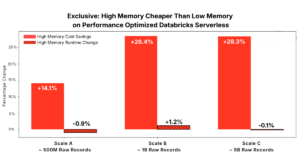
I fully expected high memory to always be more expensive. What I discovered is that when running Databricks Serverless in Performance Optimized mode, high memory is usually cheaper than low memory, sometimes dramatically so, while runtime remains nearly unchanged. As I’ll show below, across most test queries I ran, high memory was more frequently the lower-cost option for Performance Optimized Databricks Serverless, with some workloads achieving 58.1% cost reduction!
Databricks Serverless Test Setup and Memory Configurations
My setup for testing was 5 PySpark workloads. These workloads include joins, aggregations, and window functions common in production Databricks Serverless analytics pipelines (see github). They were executed across 3 scales:
- Scale A includes 100 million users, 10 million products, and 500 million transactions.
- Scale B includes 500 million users, 20 million products, and 500 million transactions.
- Scale C includes 1 billion users, 20 million products, and 5 billion transactions.
(These are the same scales and queries we tested Databricks Photon on)
Each query was run on each scale, and with each combination on Memory (Low/High) and Serverless performance target (Standard / Performance Optimized):

So in total I ended up executing 60 different combinations.
At each scale, representative analytical queries were executed independently. The idea is to isolate the effect of Databricks Serverless memory while holding all other parameters constant.
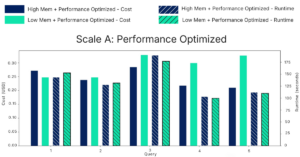
This plot shows the cost (left Y-axis) and duration (right Y-axis) and of the queries that were executed on scale A in a performance optimized mode. It’s clear that runtimes are nearly identical between high memory (blue lines) and low memory (green lines). No consistent performance advantage appears in either direction.
Cost behavior is notably different. In four of five queries, low memory costs more than high memory. For query 5, low memory is actually 35.7% more expensive than high memory!
This was surprising, as it directly contradicts the assumption that higher Databricks Serverless memory automatically increases cost.
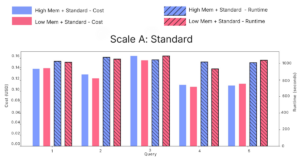
Under Standard performance, costs between memory configurations are nearly identical, with no consistent advantage in either direction.
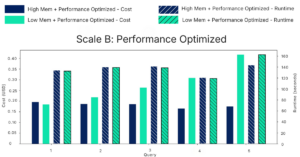
As data volume increases, the cost divergence becomes more pronounced.
At Scale B in Performance Optimized mode this trend continues. In one query, high memory is 58.1% cheaper than low memory.
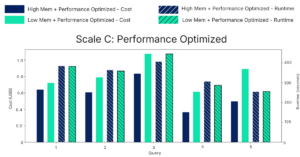
At Scale C, the largest dataset tested, it becomes conclusive – high memory is cheaper across all queries. Obviously, the absolute cost difference grows with scale, making Databricks Serverless memory selection increasingly important as workloads grow.
Looking at the averages across all workloads and scales we find that costs increase between 20.7- 55.6% on average when selecting low memory. Across all scales, runtime remains largely unchanged. High memory does not consistently reduce execution time, but it also does not increase it.
A Savings Cheat Code for Databricks Serverless Notebooks?
The most unexpected outcome of this analysis is not that high memory can sometimes be cheaper. It is how consistently this behavior appears when using Performance Optimized Databricks Serverless.
Across different query workloads and pipeline workloads, and across all three data scales, Databricks Serverless memory configured to high memory is frequently the lower-cost option.
At the same time, execution duration remains largely unchanged. High memory does not meaningfully improve runtime, but it also does not degrade it.
For teams running Performance Optimized Databricks Serverless, the default assumption that low memory is the safest or cheapest choice is not supported by observed behavior. My takeaway from this is that for these teams, notebook memory could be treated as a cost lever – not just a reliability setting.